ODA POS ビジュアルガイド
🧾 POS 📊 Admin
実画面でわかる 3分ビジュアルガイド

ODA POS かんたん操作マニュアル

フィリピン飲食店向け「POSレジ × 固定QR注文 × 厨房KDS × 飲食店会計」一体型システム(pos.oda.ltd)。各画面をタップすると拡大して見られます。
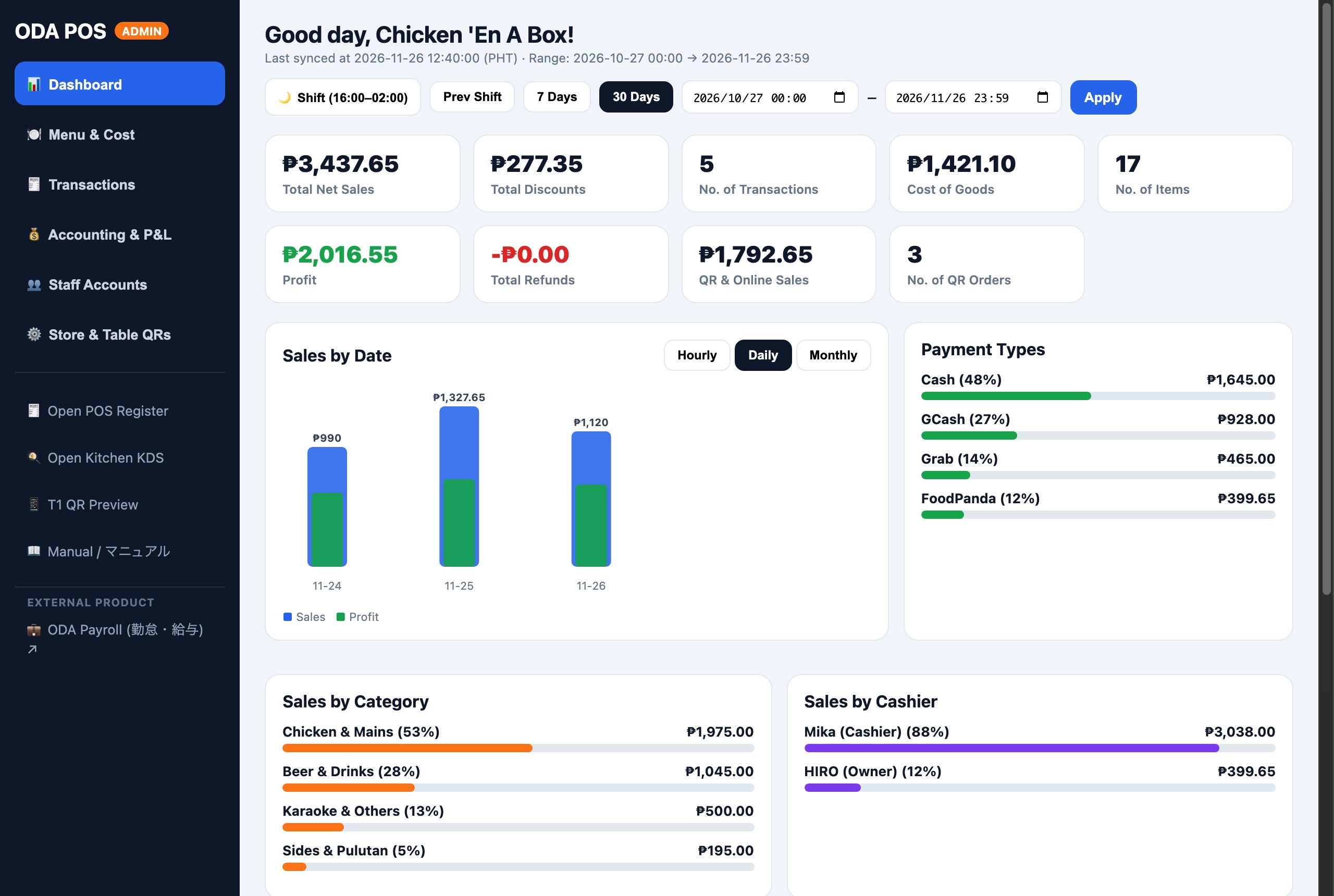
ODA POS Dashboard

1. POSレジ画面(注文入力・割引・精算・ドロワー)

店頭タブレット用。商品タップ → 保存 or 精算の2ステップで、新人スタッフでも5分で覚えられます。
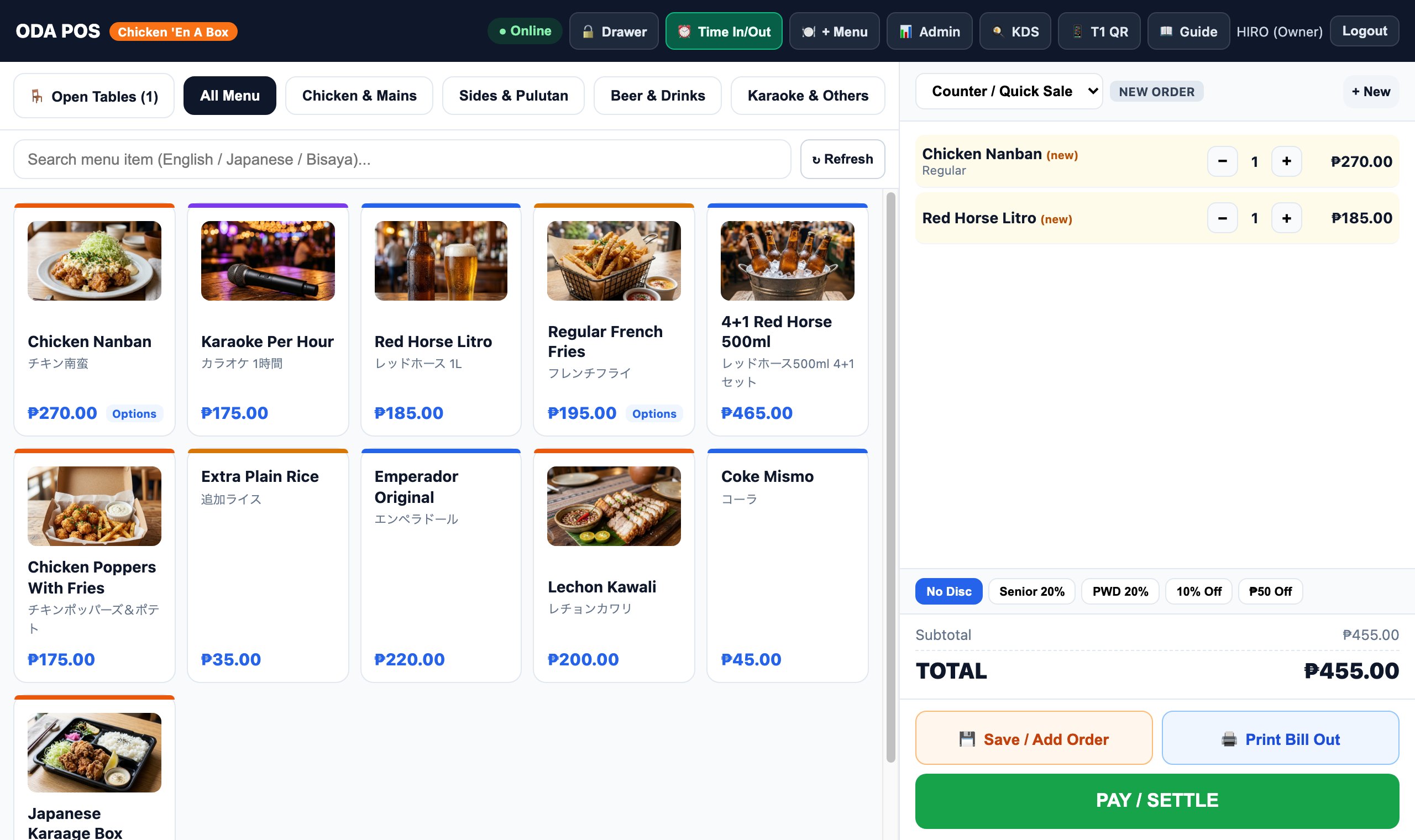
POS Register Screen
実際のPOSレジ画面(クリックで拡大)
1
商品タップで即カートへ左の商品タイルをタップ。サイズ・味などのオプション付き商品も1タップ選択。
2
Save / Bill Out / PAYSaveで厨房KDSへ送信、Print Bill Outでお会計伝票印刷、緑のPAYで精算完了。
3
Senior / PWD 20%割引下の割引ボタン1発。VAT店舗では法定12%免税+20%割引を自動計算。
4
🔓 Drawer & オフライン対応現金精算でドロワー自動開放。ヘッダーの🔓 Drawerから両替用の単体開放(店長PIN+監査ログ付)も可能。
5
🍽️ + Menu(レジから3秒商品追加)Owner/Managerはヘッダーの🍽️ + Menuから画面遷移なしで新メニューを即追加(POS&QRへ即時反映・Cashierには非表示で不正防止)。

2. テーブル管理&いたずら防止4桁PIN

左上「Open Tables」タブで全席の状況・合計金額・4桁PIN・お客様からのQR新規注文を一目で管理。
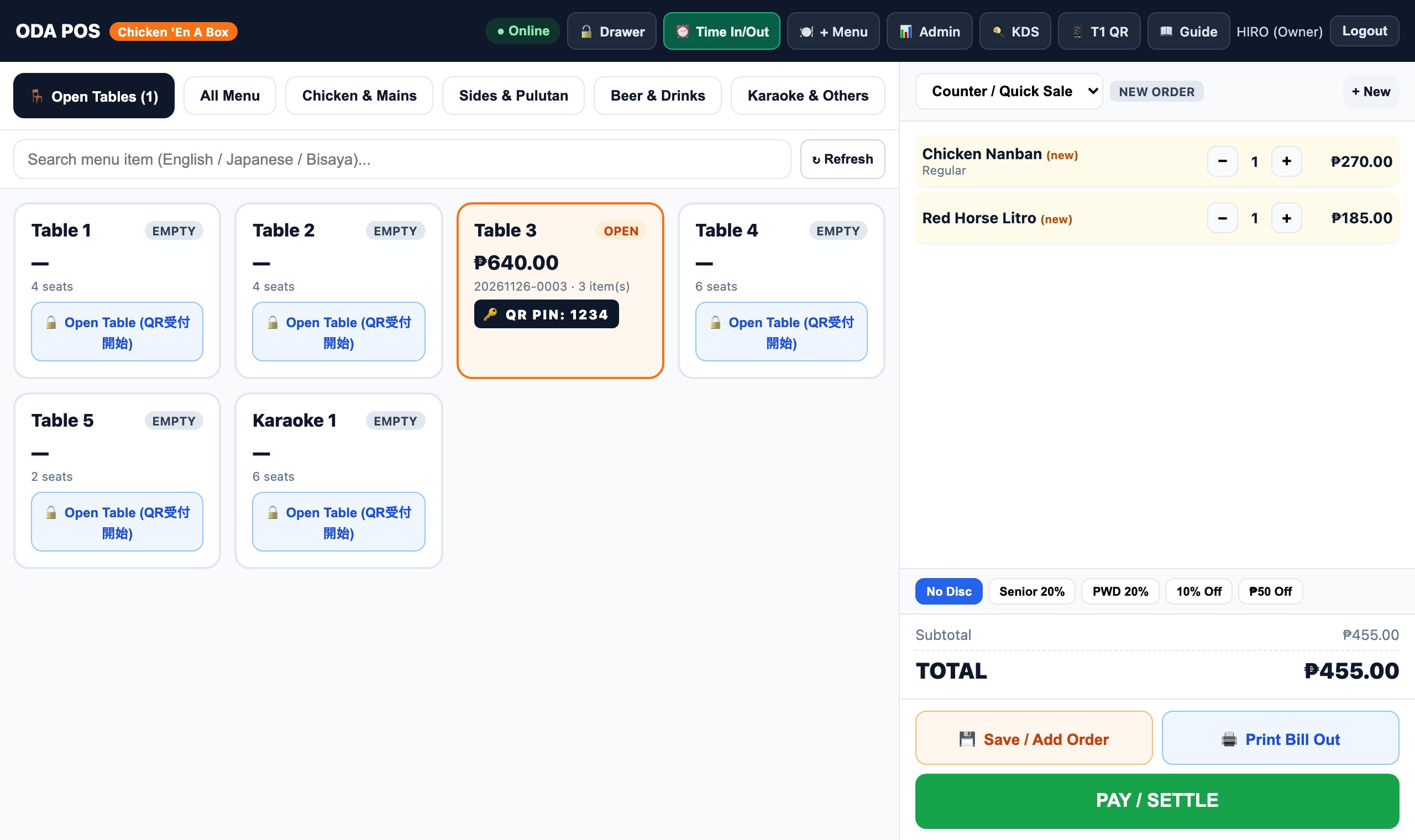
Open Tables View
テーブル一覧・稼働状況・4桁PIN表示
1
空席をタップして「Open Table」お客様をご案内したら席を開くだけ。毎回ランダムな4桁の卓PINが自動発行されます。
2
QR注文が来ると音+赤バッジで通知お客様がスマホから注文すると、チャイム音と赤枠でお知らせ。見落としゼロ。
3
会計完了で即ロック(固定QRでも安全)PAYした瞬間にその組のQR注文権限は自動失効。退店後の不正注文を防ぎます。

3. お客様スマホQR注文(英・日・ビサヤ3言語)

アプリ不要。テーブルの固定QRをカメラで読み取るだけで、お客様自身のスマホから追加注文できます。
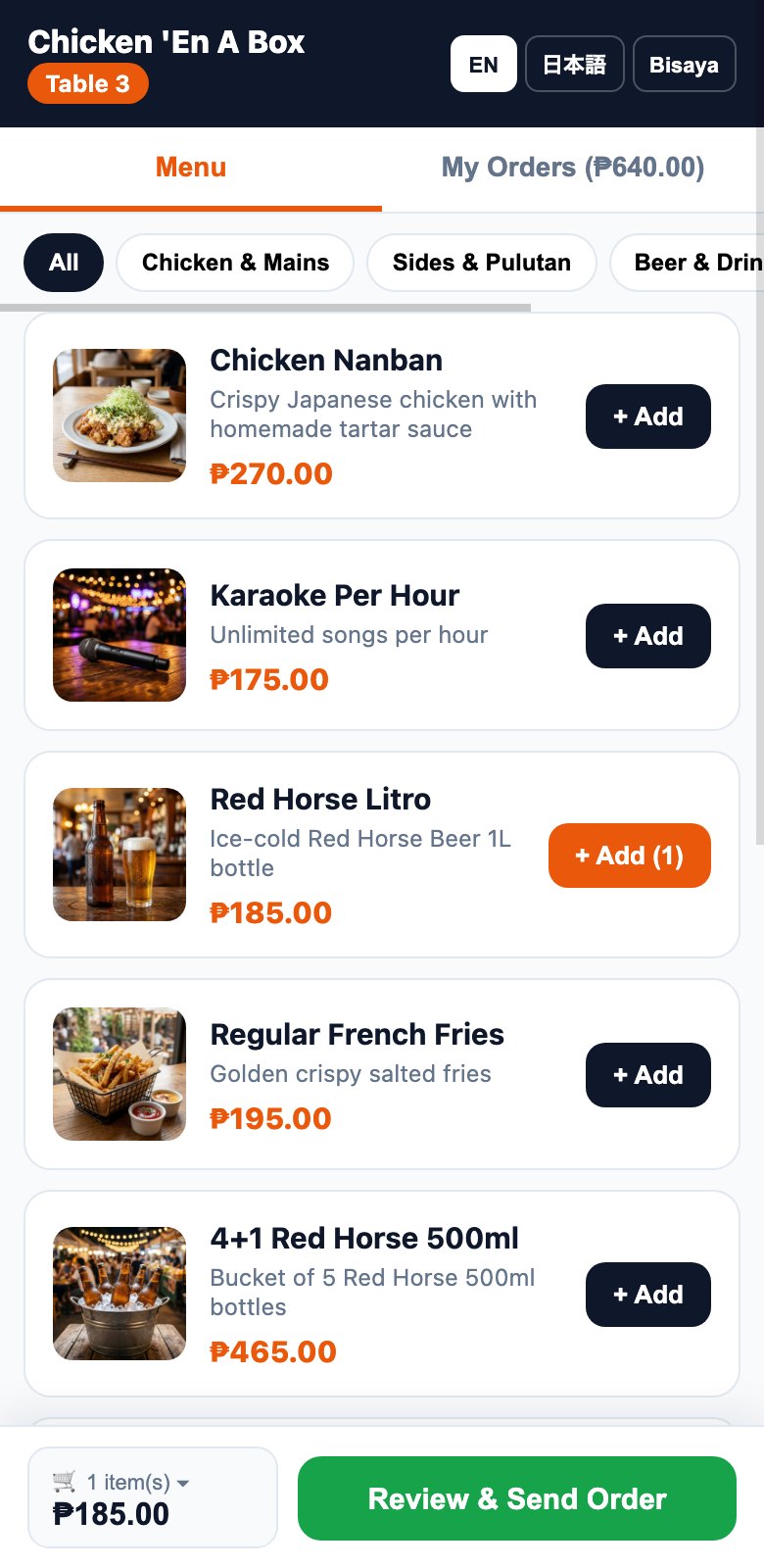
Smartphone QR Order
1
3言語ワンタップ切替画面右上で EN / 日本語 / Bisaya を瞬時に切替。日本人客もローカル客も快適。
2
4桁PIN入力で注文開始スタッフから聞いた4桁PINを入れるとロック解除(空席・店外からのいたずら注文を完全遮断)。
3
カート確認・数量変更して送信下部の緑ボタンで注文内容を確認・増減してからキッチン&POSへ直接送信。現在の注文合計も「My Orders」で確認できます。

4. 厨房ディスプレイ(KDS)

古いタブレットやスマホをキッチンに置くだけ(追加料金0円)。4秒ごとに自動更新されます。
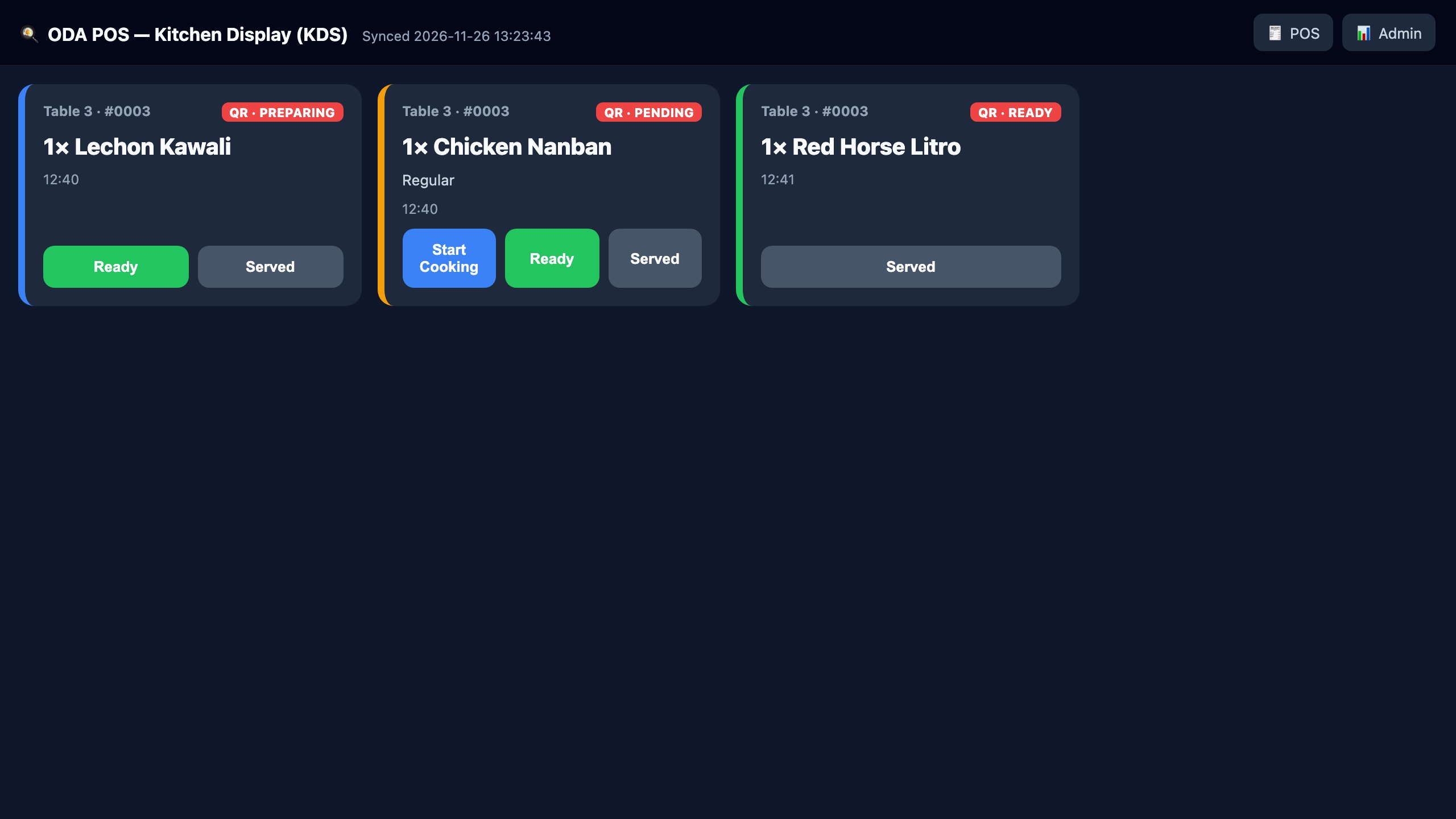
Kitchen Display KDS
厨房KDS画面(黄=未着手 / 青=調理中 / 緑=完成)
1
色分けで優先度が一目瞭然黄色(未着手)→ 青色(調理中)→ 緑色(配膳待ち)をワンタップで進行。
2
QR注文もレジ注文も一元表示テーブル番号・商品名・オプション・注文時刻が大きく表示され、紙伝票の紛失を防止。

5. オーナー売上・粗利ダッシュボード(UTAK互換)

スマホから外出先でもリアルタイム確認。深夜営業(16:00〜翌02:00等)のシフト集計もワンクリック。

Owner Analytics Dashboard
売上・原価・粗利・支払方法・カテゴリ・スタッフ別分析
1
9大KPI+粗利(Profit)を自動算出純売上・割引・件数・原価・粗利・返金・QR売上を1画面で把握。
2
🌙 深夜帯シフトボタンShift (16:00–02:00) 1クリックで日付またぎの営業売上を正確に集計。
3
Cash / GCash / Grab / FoodPanda別支払方法別・カテゴリ別・担当者別・商品別の売れ筋&利益ランキングを自動グラフ化。

6. 飲食店会計&月次P&L(Accounting & P&L)

Excel不要。レジ締め現金チェック・経費レシート写真・手書きBIR領収書(OR/SI)保管・月次損益まで内蔵。
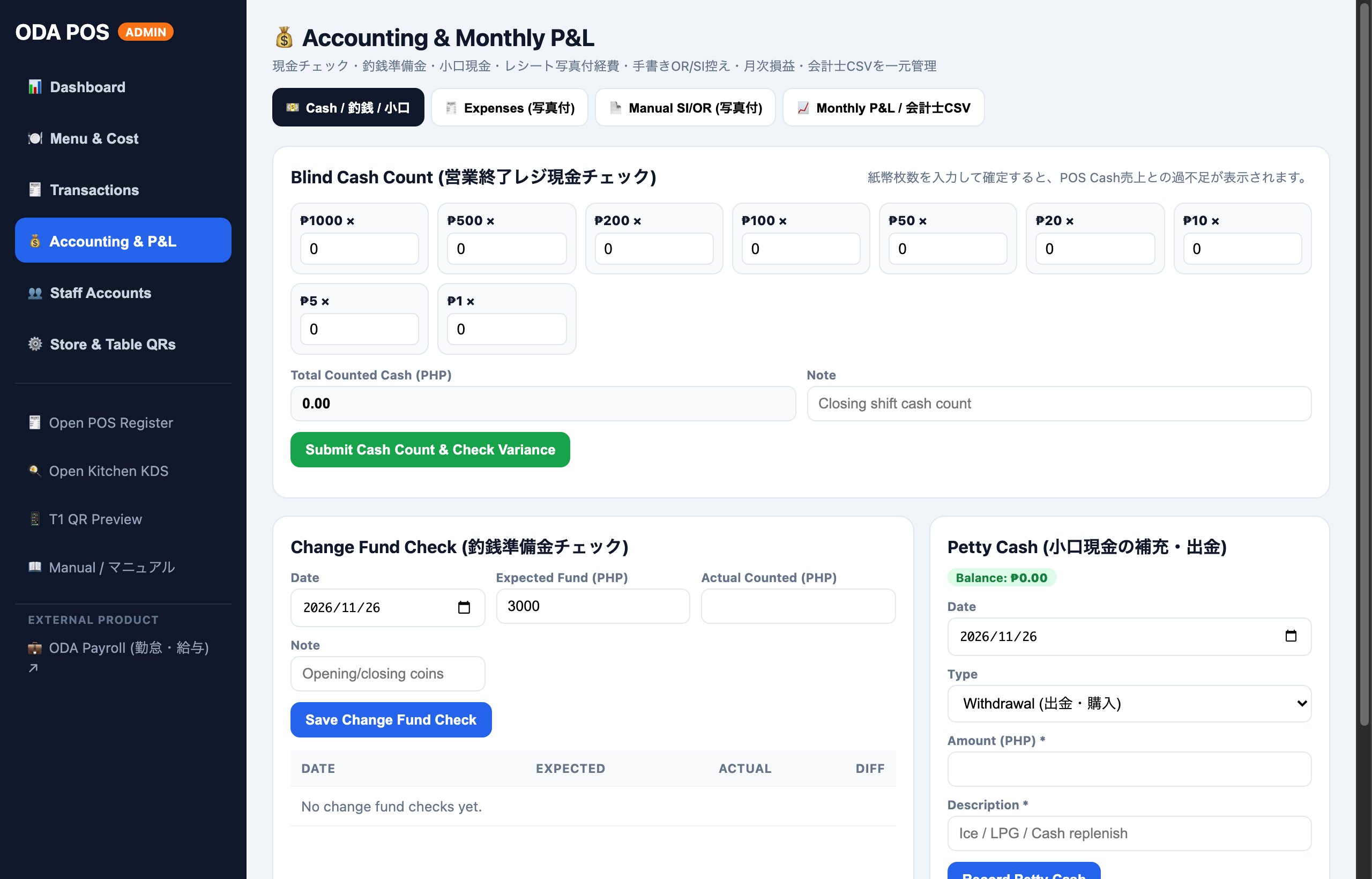
Restaurant Accounting
ブラインド現金点検・釣銭準備金・小口現金・経費/OR写真保管
1
ブラインド現金点検₱1,000〜₱1の枚数を入れるだけで、POS現金売上との過不足を自動判定(不正防止)。
2
経費&OR/SI 領収書写真クラウド保管仕入レシートや手書きOR控えをスマホ撮影して安全保存。他店からは閲覧不可。
3
月次P&L & 税理士用CSV出力家賃・光熱費・人件費から営業利益・FL比率を計算。売上/経費/ORは1クリックでExcel出力。

7. 固定テーブルQRの一括印刷 & プリンタ設定

テーブルを追加すると固定QRが自動生成されます。一度A4印刷してラミネートすれば貼り替え不要です。
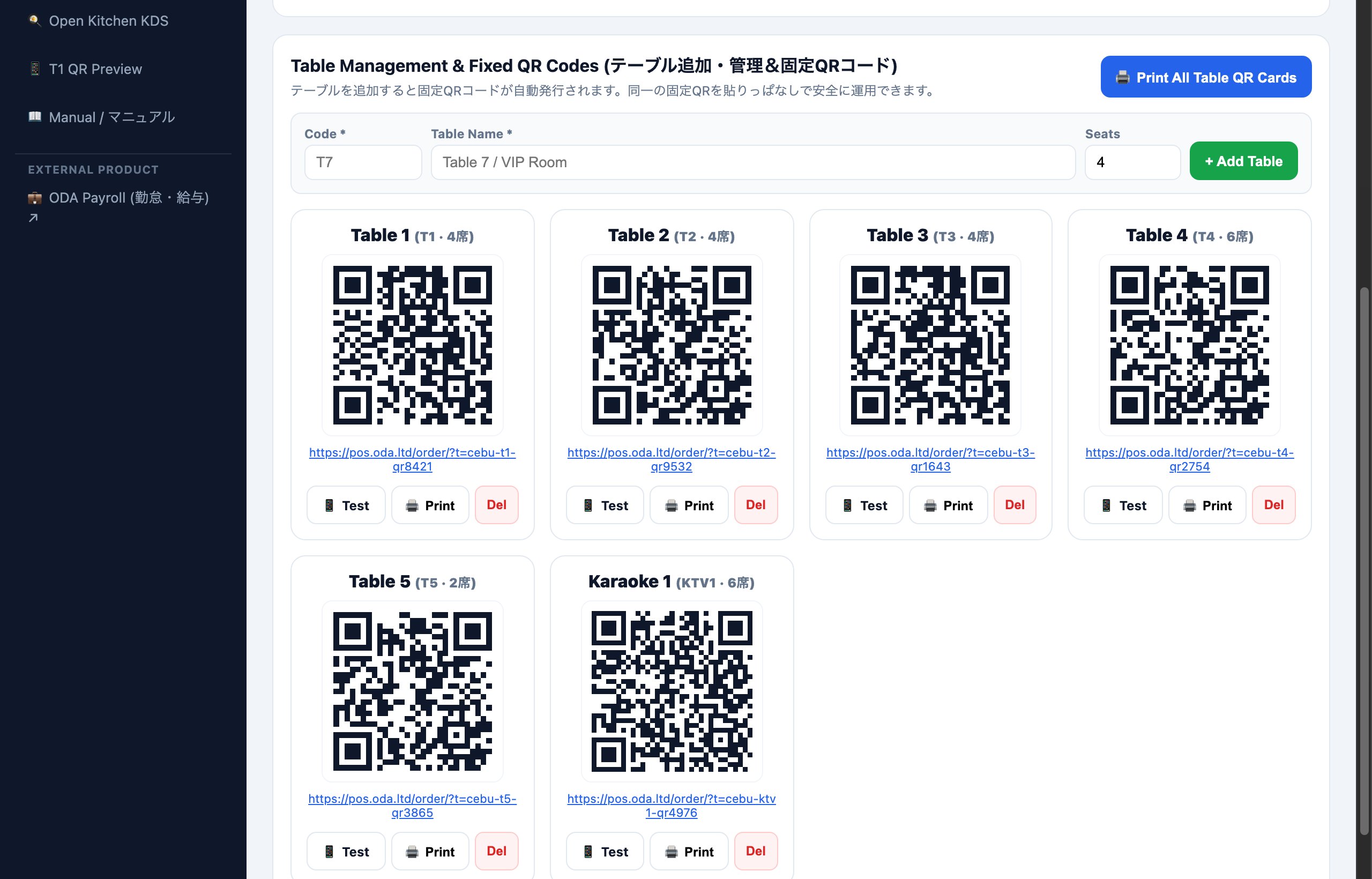
Table QR Management
テーブル追加・固定QR一覧・Print All Table QR Cards
1
「Print All Table QR Cards」で一括印刷全テーブルのQRカードをA4レイアウトで一発印刷。Testボタンですぐ動作確認。
2
サーマルプリンタ&ドロワー(Android RawBT)無料アプリ「RawBT」を入れ、58mm/80mmプリンタをペアリングするだけ。2ピン両対応でXprinter/Epson等のドロワーが自動開放。
3
スタッフ権限管理(5ロール)Owner / Manager / Cashier / Kitchen / Accountant ごとに見られる画面を厳密制御。
BIR領収書について:サーマル印刷は注文・お会計控え(*** NOT AN OFFICIAL RECEIPT *** 自動印字)です。正式領収書が必要な場合は手書きOR/SI冊子を発行し、管理画面の「Manual SI/OR」へ写真記録してください。

8. シンプルな料金プラン(14日間無料トライアル)

POSライト
₱1,500 / 店舗・月
2店舗目以降:₱1,200 / 月(20%OFF)
  • POSレジ・テーブル管理・オフライン対応
  • 3言語固定QR注文(4重いたずら防止)
  • 厨房KDS・売上&粗利ダッシュボード
  • 1店舗内の端末台数無制限
POS+会計プロ(おすすめ)
₱2,500 / 店舗・月
2店舗目以降:₱2,000 / 月(20%OFF)
  • POSライトの全機能
  • ブラインド現金点検・釣銭・小口現金
  • 経費(TIN)&手書きOR/SI写真クラウド保管
  • 月次P&L・税理士向けExcel CSV出力
💳 お支払い方法クレジットカード/デビットカード自動月額課金(Visa / Mastercard / Maya / GCash Visaカード対応)。
💼 勤怠・DOLE給与連携(任意)別プロダクト payroll.oda.ltd をご契約の店舗様は、店舗設定から1クリック連携できます。
3-MINUTE VISUAL GUIDE

ODA POS Visual User Manual

All-in-One Cloud POS, Permanent Table QR Ordering, Kitchen Display & Philippine Restaurant Accounting (pos.oda.ltd). Tap any screenshot to zoom.

ODA POS Dashboard

1. POS Register (Order, Discount, Pay & Cash Drawer)

Fast 2-pane tablet register. Staff learn it in 5 minutes.

POS Register
Live POS Register (click to zoom)
1
Tap Tiles to Add ItemsSupports sizes/flavors, search in EN/JA/Bisaya, and instant quantity edits.
2
Save · Print Bill Out · PAYSend to Kitchen KDS, print itemized Bill Out slip, or settle via Cash/GCash/Grab/FoodPanda.
3
Senior / PWD 20% Discount1-tap statutory discount (auto VAT-exempt for VAT stores) with ID number logging.
4
🔓 Cash Drawer & Offline ModeAuto-kicks RJ11 drawer on Cash pay. Use 🔓 Drawer for audited No-Sale open (Manager PIN for Cashiers).
5
🍽️ + Menu (3-Sec Quick Add)Owners & Managers can add new items directly from the POS header (live on POS & Table QRs instantly; hidden from Cashiers).

2. Open Tables & 4-Digit Anti-Abuse PIN

See every occupied table, live total, 4-digit guest PIN, and incoming QR orders at a glance.

Open Tables
Table status, live totals & per-visit PIN
1
Tap Table → Open TableGenerates a fresh 4-digit Table PIN for each group of guests.
2
Instant QR Order AlertsPlays a chime and flashes a red badge whenever a table sends a QR order.
3
Auto-Locked After PaymentClicking PAY immediately revokes that table's QR session — zero prank orders.

3. Guest Smartphone QR Ordering (EN / JA / Bisaya)

No app download needed. Guests scan the laminated table QR to browse and order.

Mobile QR Order
1
3 Languages Built-InSwitch between EN, 日本語, and Bisaya in 1 tap.
2
4-Layer SecurityClosed tables blocked + 4-digit PIN + 5-try lockout + auto-expire on PAY.
3
Review & Edit Cart Before SendingGuests adjust quantities in the review sheet before sending straight to POS & KDS.

4. Kitchen Display System (KDS)

Open pos.oda.ltd/kds/ on any spare tablet or phone — auto-refreshes every 4 seconds.

Kitchen KDS
Amber = Pending · Blue = Cooking · Green = Ready
1
1-Tap Kitchen WorkflowTap Start Cooking → Ready → Served so servers know immediately.
2
Zero Lost Paper TicketsShows table name, options, order source (POS / QR), and order time clearly.

5. Owner Analytics Dashboard (UTAK-Compatible)

Monitor Net Sales, COGS, and real Profit from your phone anytime — including overnight shifts.

Dashboard
9 KPIs, Hourly/Daily/Monthly charts & Payment breakdown
1
Real-Time Profit TrackingTracks Net Sales, Discounts, COGS, Profit, Refunds, and QR Orders live.
2
🌙 Overnight Shift Filter1 click for Shift (16:00–02:00) or any exact Date & Time range.
3
Payment, Category & Staff BreakdownCompare Cash, GCash, Grab, and FoodPanda sales effortlessly.

6. Built-In Restaurant Accounting & Monthly P&L

No messy spreadsheets — closing cash checks, expenses, BIR OR photos, and P&L in one place.

Accounting
Blind Cash Count, Change Fund, Petty Cash & Monthly P&L
1
Blind Cash CountCount ₱1000–₱1 bills/coins at closing to auto-detect cash over/short variance.
2
Receipt & OR/SI Photo VaultSnap TIN receipts & manual BIR OR booklet photos into private tenant-only cloud storage.
3
Monthly P&L & 1-Click CSVExport Sales, Expenses, and OR records to Excel CSV for your accountant anytime.

7. Permanent Table QRs & Thermal Printer Setup

Print & laminate your table QRs once — works with any Android 58mm/80mm RawBT thermal printer.

Table QRs
1-Click A4 Table QR Bulk Print
1
Print All Table QR CardsAdd tables and print all laminated-ready QR cards on A4 in 1 click.
2
Android RawBT Printer + DrawerInstall free RawBT app, pair Bluetooth/USB/LAN 58mm or 80mm printer — 2-pin drawer kick works across Epson/Xprinter.
3
5 Staff RolesSeparate logins for Owner, Manager, Cashier, Kitchen, and Accountant.

8. Simple Per-Store Pricing (14-Day Free Trial)

POS Lite
₱1,500 / store · mo
2nd+ Branch: ₱1,200 / mo (20% OFF)
  • POS Register, Open Tables & Offline Sync
  • 3-Language Table QR Ordering (4-Layer PIN)
  • Kitchen Display (KDS) & Sales Dashboard
  • Unlimited devices per store
POS + Accounting Pro (Recommended)
₱2,500 / store · mo
2nd+ Branch: ₱2,000 / mo (20% OFF)
  • Everything in POS Lite
  • Blind Cash Count, Change Fund & Petty Cash
  • TIN Expenses & Manual OR/SI Photo Vault
  • Monthly P&L & Accountant Excel CSV
💳 Easy Auto-BillingCredit Card, Debit Card, Maya Virtual Card, and GCash Visa Card accepted via Stripe.
💼 Optional Payroll LinkStores using payroll.oda.ltd (DOLE/BIR payroll) can enable 1-click punch linking in Store Settings.